Configuration Files
The program is controlled by a wide variety of settings.
Each of these settings can influence the output or the user experience.
When the program runs it looks for the settings in a set of setting files.
These files and their location are described in more detail below.
Configuration files are basically text files similar to INI files in structure.
They can be modified using the Options dialog or the Printer API.
You can also open and edit the files using Notepad or any other suitable editor.
The files can be saved using Unicode, UTF-8, or just plain ANSI encoding.
Runonce Settings
When a print job is sent to the program it will look for a runonce file.
The runonce setting file is used to control the PDF creation from another program.
A runonce settings file is only valid for one print job and will be removed automatically when it is read.
All other settings files are ignored if a runonce file exists.
Normal Settings
In case there is no runonce file, the program will look for a normal settings file.
The normal settings file is written by the options dialog, which can be launched from the Start menu.
Global Settings
The settings read from the normal settings file can be overwritten by settings in a global settings file.
A global settings file can contain a list of forced settings that apply to all users on the system.
If the same setting is specified in both the normal setting file and the global setting file
then the resulting value is taken from the global setting file.
The global settings does not have any effect when a runonce settings file is used.
Default Settings
Default settings are the values that are used in case no values were specified elsewhere.
User Settings
A user file is created to store information such as the last file and folder name used by the user.
File Names and Location
The table below lists the configuration files and their location.
In the table below you will find the following constants: CSIDL_LOCAL_APPDATA, CSIDL_APPDATA, and CSIDL_COMMON_APPDATA.
They refer to special folders in the operating system.
These locations vary with different versions of the Microsoft Windows.
Their values also change for different language versions of the operating system.
| Runonce Settings | runonce.ini or
runonce_documentname.ini | {CSIDL_LOCAL_APPDATA}\PDF Writer\printername\ |
| Normal Settings | settings.ini | {CSIDL_APPDATA}\PDF Writer\printername\ |
| Global Settings | global.ini | {CSIDL_COMMON_APPDATA}\PDF Writer\printername\ |
| Default Settings | defaults.ini | {CSIDL_COMMON_APPDATA}\PDF Writer\printername\ |
| User Settings | user.ini | {CSIDL_APPDATA}\PDF Writer\printername\ |
The printername part of the file names must be substituted with the name of the printer that you want to control
with the settings in the file.
For runonce.ini there is a special version named runonce_DOCUMENTNAME.ini.
Before the printer looks for the normal runonce.ini it will check for the existence of a
document specific edition named runonce_DOCUMENTNAME.ini.
This is a runonce file where part of the file name is the document name of
the printed document. You can use this feature to direct the printer to
a specific runonce file in an environment where multiple processes are trying to
use the runonce feature at the same time. The document name part of the file name
is typically what you see in the printer's spooler queue.
You can try to pause your printer to see the names before they are processed.
Special characters in the document name are encoded using a normal URL encoding.
This means that the specific runonce file name for a typical Microsoft Word document
named test.docx will be runonce_Microsoft%20Word%20-%20test.docx.ini
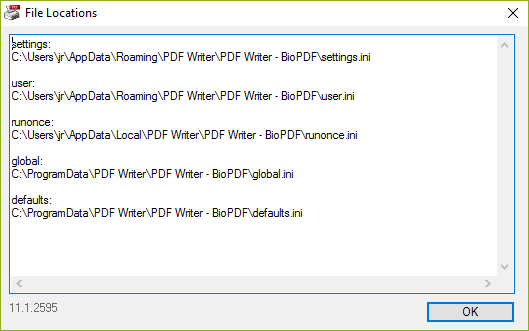
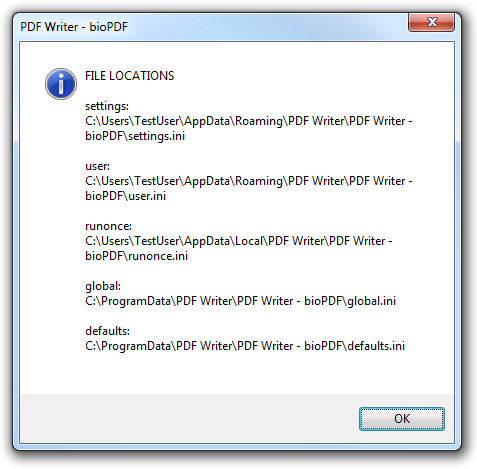
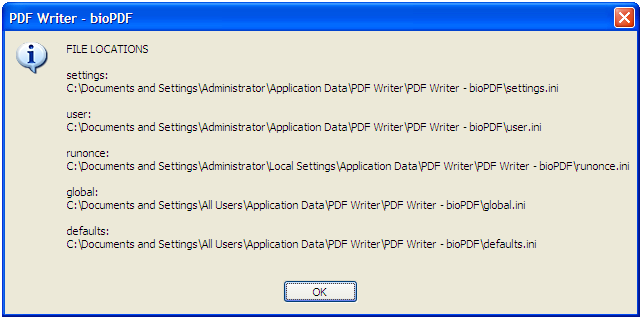
If you want to see the values of CSIDL_LOCAL_APPDATA, CSIDL_APPDATA, and CSIDL_COMMON_APPDATA
then you can run the gui.exe with the info command line switch.
That will bring up a message box where you can see the calculated location of each of the settings files.
C:\Program Files\bioPDF\PDF Writer>gui.exe printer="PDF Writer - BioPDF" info
File locations on an English Windows 10 and 11 for the jr user.
File locations on an English Windows 7 for the TestUser user.
File locations on an English Windows XP for the Administrator user.
Encoding
The configuration files support different types of encoding.
Depending on the type of encoding you choose, you must prefix the file
content with a signature that identifies the encoding.
Only ANSI files do not require any encoding. However, ANSI files
cannot contain any international characters.
When you use the printer API the encoding will be done by the API itself.
Unicode files are prefixed with two bytes 0xFF and 0xFE.
This signature is for Little Endian Unicode.
The other type of Unicode is named Big Endian Unicode and is prefixed with 0xFE followed by 0xFF.
Little endian is preferred over big endian.
UTF-8 encoded files must be prefixed with the byte sequence 0xEF, 0xBB, 0xBF.
Compatibility Notes
File Names and Location before version 7
The file locations listed below were changed in version 7.
%APPDATA% and %ProgramFiles% refers to the value of the APPDATA and ProgramFiles environment variables.
| Runonce Settings | runonce@printername.ini | %APPDATA%\bioPDF\PDF Writer\ |
| Normal Settings | settings@printername.ini | %APPDATA%\bioPDF\PDF Writer\ |
| Global Settings | global@printername.ini | %ProgramFiles%\bioPDF\PDF Writer\ |
| Default Settings | defaults@printername.ini | %ProgramFiles%\bioPDF\PDF Writer\ |
| User Settings | user@printername.ini | %APPDATA%\bioPDF\PDF Writer\ |
Before version 5
Prior to version 5 you could control the settings for individual printers by using something called instance names.
With version 5 instance names are no longer supported. A printer named My Printer [Invoice] would have
the instance name Invoice prior to version 5. The corresponding setting file would be settings-Invoice.ini.
Starting with version 5 the settings-Invoice.ini file should be named settings@My Printer [Invoice].ini.
The - is replaced by an @ and the instance name is replaced by the full printer name.
In order to make upgrading easier the printer will try to rename the files automatically to match the new naming conventions.
|